How to create an addon domain in cPanel

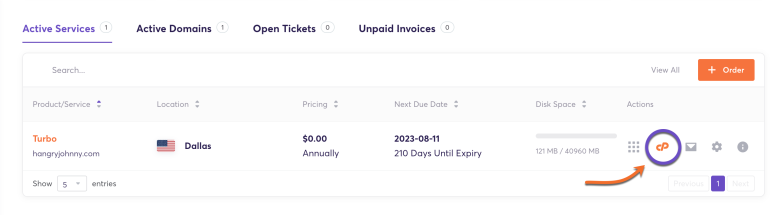
1) Log in to your cPanel. There are many ways to do this, but the surefire easiest way is to log in to your Client Area, then open your cPanel.
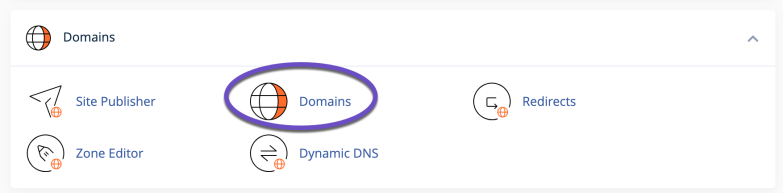
2) Once your cPanel opens, locate the ‘DOMAINS’ section and click the Domains icon
"cPanel

3) Click on the Create A New Domain button
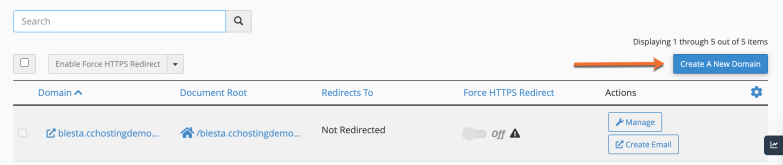
Create a subdomain in cPanel cPanel > Domains > Create a New Domain

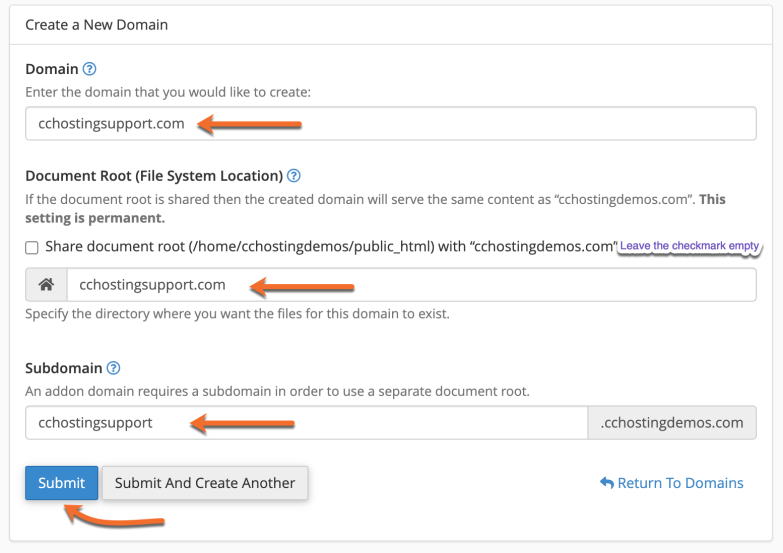
4) Enter the following information:

  • Domain: enter the add-on domain that you want to add.

  • Document root: leave the checkmark empty for the Share document root option.

  •  

By default, cPanel automatically fills in the details for the subdomain and document root. You can either leave them as default or modify the information.

4) The last step is to click Submit button.  The subdomain will be created.

From the cPanel > Domains area, you can see the list of addon domains under your main account, and you can manage or delete these addon domains anytime needed.

That’s it! You now know how to create subdomains in cPanel.

  • addon domain, sub domain
  • 1 Users Found This Useful
Was this answer helpful?

Related Articles

How to Change Image Sizes in cPanel?

If you find yourself spending a lot of time scaling or resizing images before you upload them to...

How to Create backup & store them remotely in any Server using SCP?

Step::1 Login to cPanel and go to Backup Wizard in Files section.Step::2 Now click over Backup...

How to Install Magento in cPanel using Softaculous?

Here in this tutorial we will learn about how to install Magento in cPanel using Softaculous....

How to Install OpenCart in cPanel using Softaculous?

In this tutorial, I am going to show you how to quickly install OpenCart from Softaculous....

How to Uninstall Magento from cPanel using Softaculous?

Step::1 Login to your cPanel dashboardStep::2 Scroll down to the Softaculous Apps Installer under...